Roblox Goal Confetti with ParticleEmitter
Emit one burst of pink particles when a player touches GoalPlatform, then let the effect end instead of running continuously.
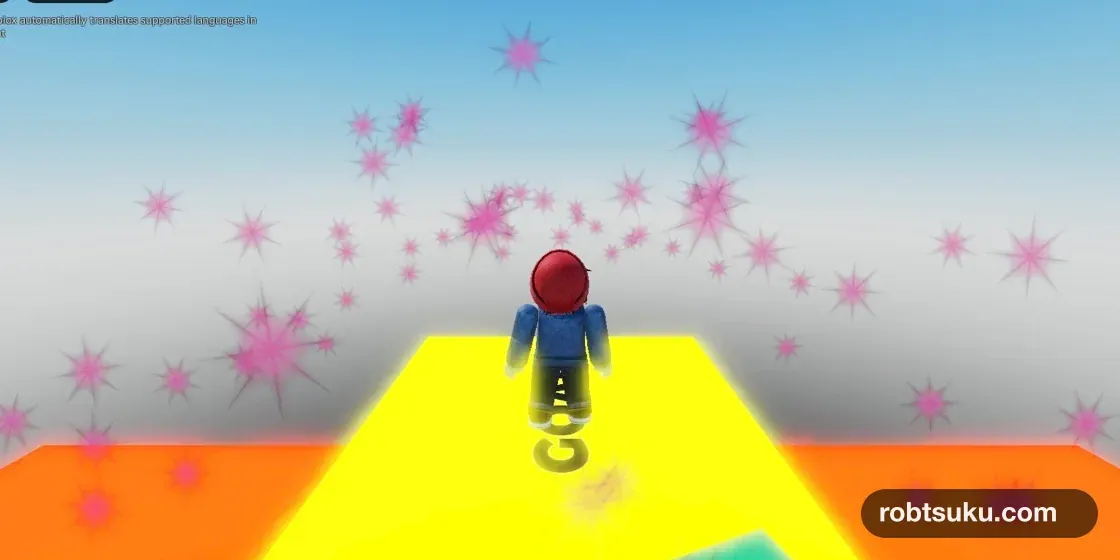
The yellow GOAL will release one burst of pink, confetti-like particles when a player reaches it. The particles disappear in about three seconds, and the emitter does not keep producing new ones while the goal is idle. Allow about six minutes; this effect needs neither Robux nor a published game.
Start with the Course > GoalPlatform from Finish Your First Roblox Obby. Stop any running playtest before editing.
1. Add the confetti starting point
In Explorer, expand Course > GoalPlatform. Use the plus button beside GoalPlatform to add an Attachment, then rename it ConfettiPoint. Set its Position to 0, 0.7, 0.
Use the plus button beside ConfettiPoint to add a ParticleEmitter, then rename it GoalConfetti. Explorer should now show this hierarchy:
Course
└─ GoalPlatform
   └─ ConfettiPoint (Attachment)
      └─ GoalConfetti (ParticleEmitter)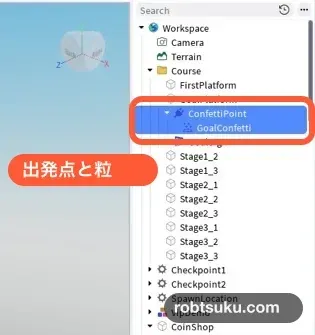
Roblox’s ParticleEmitter guide allows an emitter inside either a Part or an Attachment. An Attachment gives you a precise emission point. Here, Position = 0, 0.7, 0 places the start 0.7 studs above the center of the yellow platform.
Tip — An Attachment marks a position
An
Attachmentis a small reference point inside a Part. MovingConfettiPointchanges where the particles begin without movingGoalPlatform.
Tip — A particle is a small image in 3D space
A
ParticleEmitterdisplays many small 2D images to make effects such as smoke, sparks, or confetti. This lesson tints Roblox’s built-in sparkle texture pink.
2. Turn off continuous emission
Select GoalConfetti and open Properties. Turn Enabled off before changing the other values.
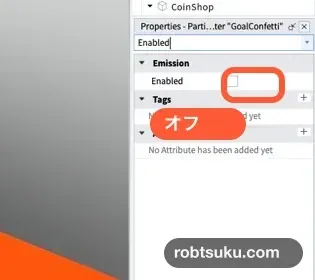
With Enabled off, the emitter does not create new particles continuously. The Script will call ParticleEmitter:Emit() only when the player reaches the goal.
Enter these values:
| Property | Value |
|---|---|
Enabled |
Off |
Color |
236, 72, 153 |
Lifetime |
2.4, 3 |
Speed |
14, 20 |
SpreadAngle |
60, 60 |
EmissionDirection |
Top |
Acceleration |
0, -12, 0 |
Drag |
0.6 |
Size |
0.75 |
Transparency |
0.1 |
Rotation |
0, 360 |
RotSpeed |
-180, 180 |
LightEmission |
0 |
LightInfluence |
0 |
Click the Color swatch and enter RGB 236, 72, 153. If Lifetime or Speed expands into two fields, enter the first number under Min and the second under Max.
Lifetime controls how many seconds each particle remains. Roblox’s particle lifetime documentation explains that the two values form a per-particle minimum and maximum, so these particles last between 2.4 and 3 seconds.
EmissionDirection = Top sends them upward. The negative Y value in Acceleration pulls them back down, while Drag reduces their speed. If the particles cover the character, reduce Size to about 0.5 before reducing the burst count; that preserves the spread while improving visibility.
Tip — SpreadAngle widens the burst
SpreadAngle = 60, 60spreads particles around the upward direction.0, 0would look like one narrow stream.
3. Emit 70 particles on goal contact
Add a Script to ServerScriptService, rename it GoalConfettiScript, and replace its contents with this code:
local Players = game:GetService("Players")

local goal = workspace:WaitForChild("Course"):WaitForChild("GoalPlatform")
local confetti = goal:WaitForChild("ConfettiPoint"):WaitForChild("GoalConfetti")
local cooldown = {}

local function onGoalTouched(hit)
	local character = hit:FindFirstAncestorOfClass("Model")
	local humanoid = character and character:FindFirstChildOfClass("Humanoid")
	local player = humanoid and Players:GetPlayerFromCharacter(character)
	if not player or cooldown[player] then
		return
	end

	cooldown[player] = true
	confetti:Emit(70)
	print("GOAL_CONFETTI_PASS", player.Name)

	task.delay(2, function()
		cooldown[player] = nil
	end)
end

goal.Touched:Connect(onGoalTouched)
Players.PlayerRemoving:Connect(function(player)
	cooldown[player] = nil
end)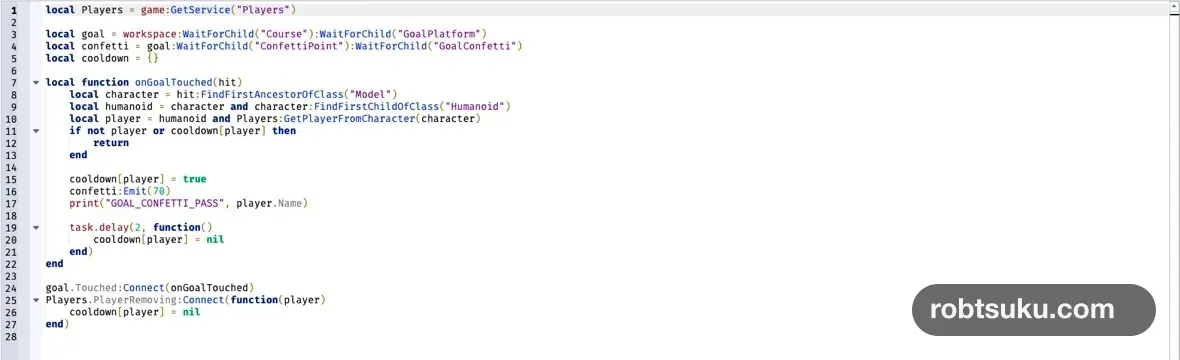
A character can touch the platform with several body parts almost at once. cooldown[player] accepts only the first contact for two seconds, preventing several 70-particle bursts from stacking.
The server finds a Model, checks for a Humanoid, then converts that character to a Player. A falling Part or coin has no Humanoid, so it does not trigger the effect. The client never sends a “goal reached” claim; the server observes contact with the real platform.
The cooldown is temporary and is not saved in a Data Store. Each player has a separate entry, so one player’s two-second wait does not block another player’s burst.
4. Check the start, burst, and finish
Press Play and wait in front of GoalPlatform for about three seconds. No particles should appear while Enabled is off. Then walk onto the yellow GOAL.

When the character’s foot reaches GoalPlatform, one pink burst should spread upward and Output should print GOAL_CONFETTI_PASS with the player’s name. Wait about three seconds. The existing particles should disappear, and no new particles should replace them.
Step off and touch the goal again after the two-second cooldown. One new burst should appear. Small movements immediately after the first contact must not stack more bursts.
Check the three states separately:
- Before contact: no particles.
- At contact: one upward pink burst and one Output message.
- About three seconds later: no particles and no continuous emission.
If the burst fills the screen, change Emit(70) to Emit(40). If it is hard to see, check the camera distance, particle Size, and platform brightness before increasing the count.
Troubleshooting
- Particles appear before Play or before contact: Turn
GoalConfetti.Enabledoff. - The goal does nothing: Check the
ConfettiPoint > GoalConfettihierarchy and exact capitalization in the Script. - Particles move downward immediately: Set
EmissionDirectiontoTop. - One touch creates several bursts: Restore
cooldown[player] = trueandtask.delay(2, ...). - Output shows a red error: Fix the first red line and compare
Course,GoalPlatform,ConfettiPoint, andGoalConfettiletter for letter.
Completion check
- No particles appear while the player waits before the goal.
- Touching GoalPlatform creates one burst of 70 pink particles.
- The particles spread upward, fall, and disappear in about three seconds.
- Repeated body-part contacts during the cooldown do not stack effects.
- A later goal touch can create one new burst.
The same Enabled = false plus Emit() pattern can produce short effects for a treasure chest, level-up, or successful button press without leaving an emitter running.
Official sources
Roblox Goal Badge: Award It with BadgeService
Create a goal badge in Creator Dashboard, then award it safely from a server Script when a player touches GoalPlatform.
Build this feature