RobloxのDeveloper Productでゲーム内コインを販売する方法
何度でも買える100コイン商品を作り、ProcessReceiptで購入1回につき100だけScoreへ保存し、同じ購入処理IDの二重付与を防ごう。
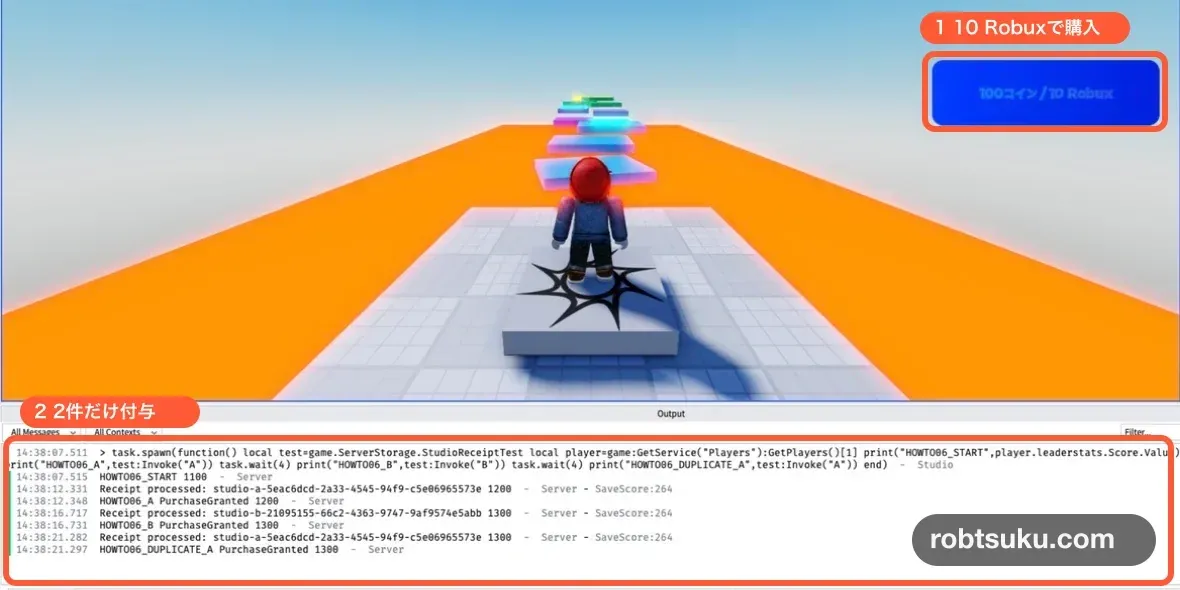
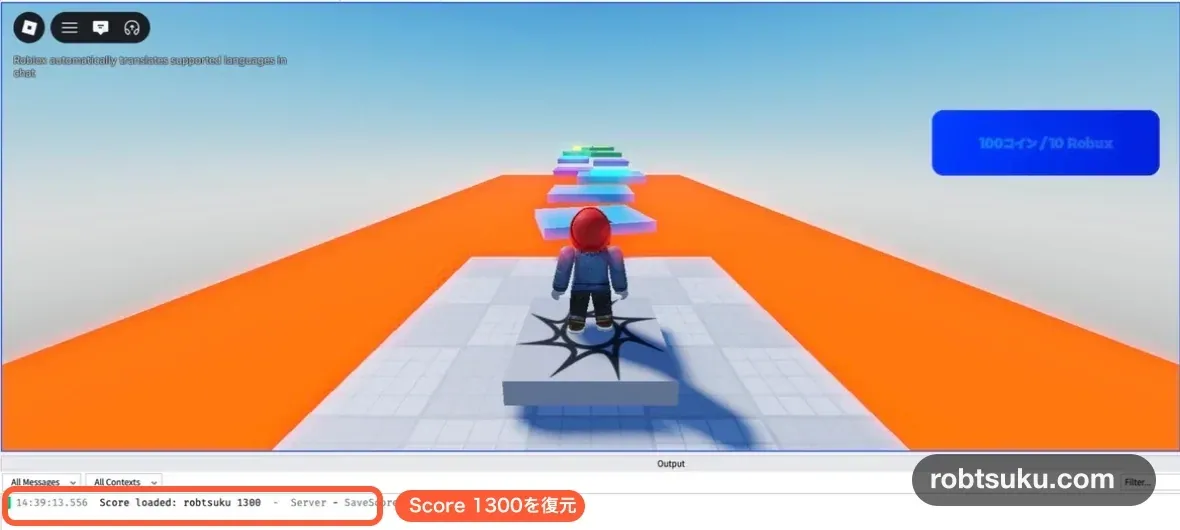
同じ商品を2回処理すると、右上のScoreが100ずつ、合計200増えるようにする。同じ購入処理IDをもう一度処理しても増えない。次の画像が、2回分だけを受け取った完成状態だ。読了は5〜8分、作業時間の目安は15分になる。
この記事は、ScoreをData Storeへ保存する記事の続きだ。ServerScriptService > SaveScoreがあり、退出後もScoreが戻る状態から始めよう。自分が所有するPublish済みゲームも必要になる。
完成確認にはStudioのテスト処理を使うため、Robuxは使わない。本番でプレイヤーが商品を買う場合は、購入画面に表示されたRobuxを使う。この記事では実購入、実売上、Roblox上の購入履歴を作らない。
Tip — Developer Productは何度でも買える商品
Developer Productは、100コインや回復薬のように、同じ人が複数回買える商品だ。VIP権限のような一度きりの機能にはPassを使う。この記事では100コインを2回処理できることを確かめる。
Tip — receiptは1回の購入処理につく受取番号
receipt(レシート)は、1回の購入処理を見分ける受取番号だ。コードでは
PurchaseIdという名前で受け取る。同じPurchaseIdを2回受け取っても1回だけ100コインを増やし、別のPurchaseIdならもう100コインを増やす。
1. 100コインの商品を作る
Creator Dashboardで対象ゲームを開き、収益化 > 開発者製品へ進む。開発者製品を制作を選び、開いた作成画面へ次の内容を入力しよう。
| 項目 | 入力する内容 |
|---|---|
| 名前 | 100コイン |
| 詳細 | ゲーム内のScoreへ100コインを追加するDeveloper Product |
| 販売中のアイテム | オン |
| 価格 | 10 |
| 管理された価格設定 | オフ |
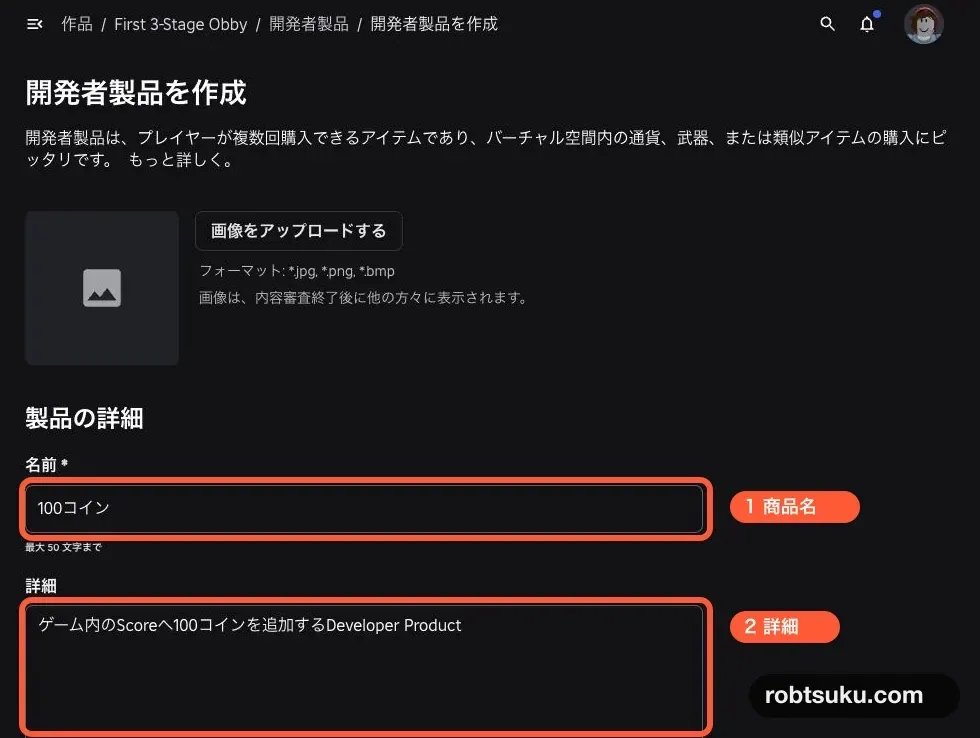
この記事では表示を比べやすくするため、管理された価格設定をオフにする。実際のゲームで有効にすると、参加者によって価格が変わることがある。どちらの設定でもゲーム画面へ10を直接書かず、手順4でAPIから現在価格を読む。
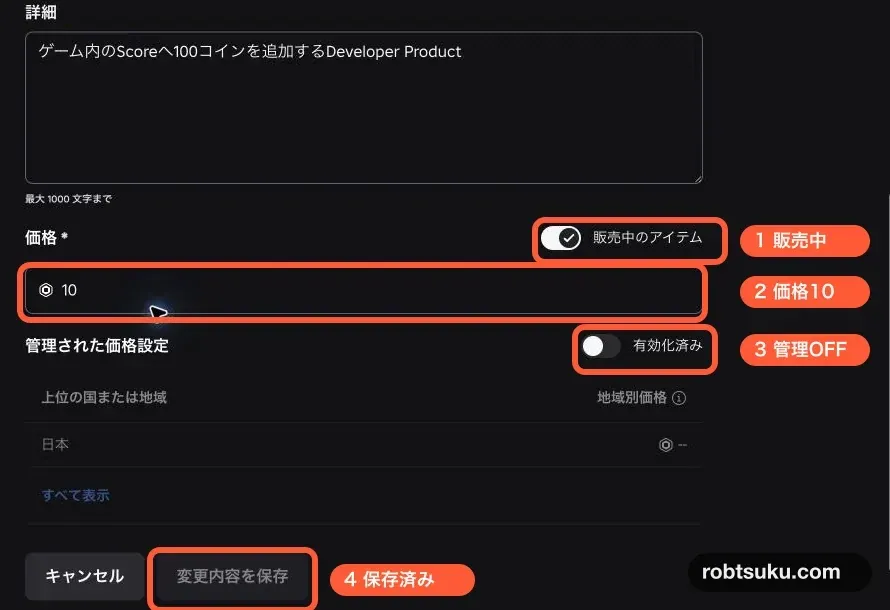
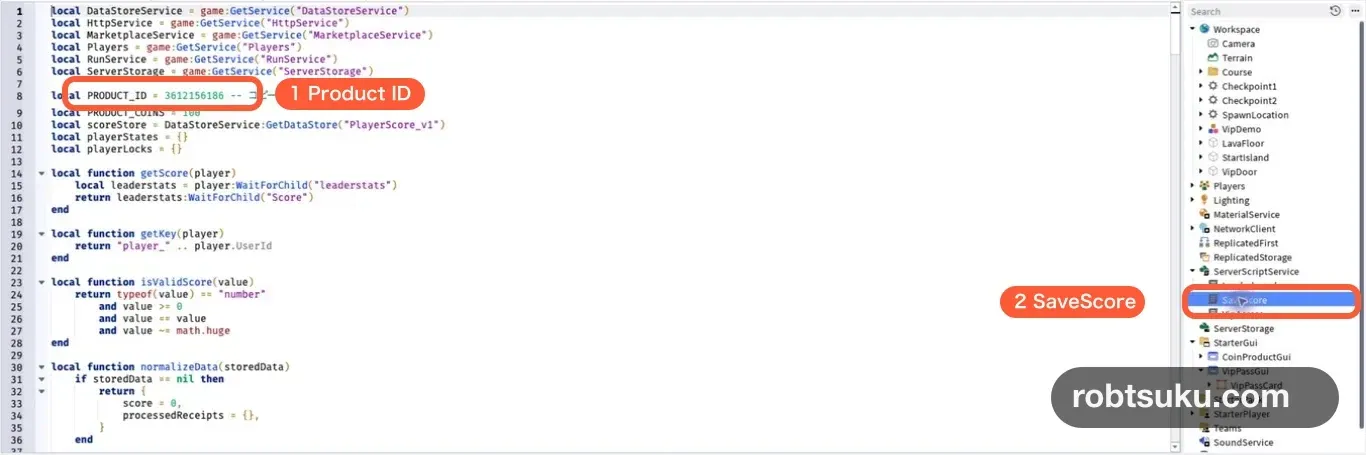
変更内容を保存を押したら、商品一覧の製品IDに表示された数字をコピーしよう。その他のオプションにアセットIDをコピーがある場合は、それを選んでもよい。コピーした数字がProduct IDだ。
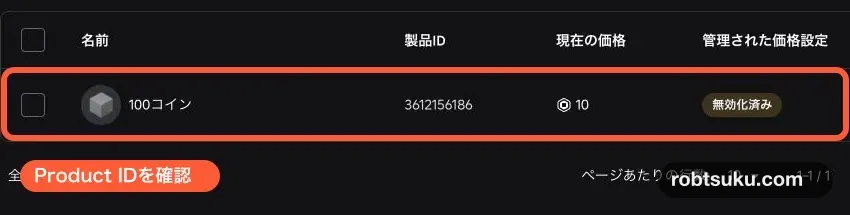
Product IDはゲーム内の商品を見分ける番号だ。あとで作るコードのPRODUCT_ID = 0にある0だけを、この数字へ置き換える。
2. SaveScoreを購入対応へ置き換える
購入特典を渡す受付は、serverで動くMarketplaceService.ProcessReceiptだ。Product ID、Player ID、PurchaseIdを確認し、ScoreとPurchaseIdの保存が終わったときだけRobloxへ完了を返す。
ExplorerでServerScriptService > SaveScoreを開く。元のコードをすべて消し、次へ置き換えよう。PRODUCT_ID = 0の0は、手順1でコピーした数字にする。
local DataStoreService = game:GetService("DataStoreService")
local HttpService = game:GetService("HttpService")
local MarketplaceService = game:GetService("MarketplaceService")
local Players = game:GetService("Players")
local RunService = game:GetService("RunService")
local ServerStorage = game:GetService("ServerStorage")

local PRODUCT_ID = 0 -- コピーしたProduct IDへ置き換える
local PRODUCT_COINS = 100
local scoreStore = DataStoreService:GetDataStore("PlayerScore_v1")
local playerStates = {}
local playerLocks = {}

local function getScore(player)
	local leaderstats = player:WaitForChild("leaderstats")
	return leaderstats:WaitForChild("Score")
end

local function getKey(player)
	return "player_" .. player.UserId
end

local function isValidScore(value)
	return typeof(value) == "number"
		and value >= 0
		and value == value
		and value ~= math.huge
end

local function normalizeData(storedData)
	if storedData == nil then
		return {
			score = 0,
			processedReceipts = {},
		}
	end

	if isValidScore(storedData) then
		return {
			score = storedData,
			processedReceipts = {},
		}
	end

	if typeof(storedData) ~= "table" then
		return nil
	end

	if not isValidScore(storedData.score) then
		return nil
	end

	local storedReceipts = storedData.processedReceipts
	if storedReceipts ~= nil and typeof(storedReceipts) ~= "table" then
		return nil
	end

	for purchaseId, productId in pairs(storedReceipts or {}) do
		if typeof(purchaseId) ~= "string"
			or purchaseId == ""
			or (
				typeof(productId) ~= "number"
				and productId ~= true
			)
		then
			return nil
		end
	end

	local data = table.clone(storedData)
	data.score = storedData.score
	data.processedReceipts =
		storedReceipts and table.clone(storedReceipts) or {}
	return data
end

local function withPlayerLock(player, callback)
	while playerLocks[player] do
		task.wait()
	end

	playerLocks[player] = true
	local results = table.pack(pcall(callback))
	playerLocks[player] = nil
	return table.unpack(results, 1, results.n)
end

local function loadScore(player)
	local state = {
		status = "loading",
		persistedScore = 0,
		finalSaveStarted = false,
	}
	playerStates[player] = state

	local success, errorMessage = withPlayerLock(player, function()
		local score = getScore(player)
		local storedData = scoreStore:GetAsync(getKey(player))
		local data = normalizeData(storedData)
		if not data then
			error("Stored score data has an unexpected format")
		end

		score.Value += data.score
		state.persistedScore = data.score
		state.status = "ready"
		print("Score loaded:", player.Name, score.Value)
	end)

	if not success then
		state.status = "failed"
		warn("Score load failed:", errorMessage)
	end

	player:SetAttribute("ScoreDataReady", state.status == "ready")
end

local function waitForReadyState(player)
	while player.Parent == Players and not playerStates[player] do
		task.wait()
	end

	local state = playerStates[player]
	if not state then
		return nil
	end

	while state.status == "loading" and player.Parent == Players do
		task.wait()
	end

	if player.Parent ~= Players or state.status ~= "ready" then
		return nil
	end

	return state
end

local function saveScore(player)
	local state = playerStates[player]
	if not state then
		return
	end

	local success, errorMessage = withPlayerLock(player, function()
		if state.finalSaveStarted then
			return
		end
		state.finalSaveStarted = true

		if state.status ~= "ready" then
			return
		end

		local score = getScore(player)
		local scoreAtStart = score.Value
		local scoreDelta = scoreAtStart - state.persistedScore
		local updatedData = scoreStore:UpdateAsync(
			getKey(player),
			function(storedData)
				local data = normalizeData(storedData)
				if not data then
					return nil
				end

				data.score = math.max(0, data.score + scoreDelta)
				return data
			end
		)

		if updatedData == nil then
			error("Player data update was cancelled")
		end
		updatedData = normalizeData(updatedData)
		if not updatedData then
			error("Stored score data has an unexpected format")
		end

		local changesDuringSave = score.Value - scoreAtStart
		local reconciledScore = math.max(
			0,
			updatedData.score + changesDuringSave
		)
		score.Value = reconciledScore
		state.persistedScore = updatedData.score
		print("Score saved:", player.Name, updatedData.score)
	end)

	if not success then
		warn("Score save failed:", errorMessage)
	end
end

local function processReceipt(receiptInfo)
	if typeof(receiptInfo) ~= "table" then
		return Enum.ProductPurchaseDecision.NotProcessedYet
	end

	if receiptInfo.ProductId ~= PRODUCT_ID then
		warn("Unknown Developer Product:", receiptInfo.ProductId)
		return Enum.ProductPurchaseDecision.NotProcessedYet
	end

	if typeof(receiptInfo.PlayerId) ~= "number"
		or typeof(receiptInfo.PurchaseId) ~= "string"
		or receiptInfo.PurchaseId == ""
	then
		return Enum.ProductPurchaseDecision.NotProcessedYet
	end

	local player = Players:GetPlayerByUserId(receiptInfo.PlayerId)
	if not player then
		return Enum.ProductPurchaseDecision.NotProcessedYet
	end

	local state = waitForReadyState(player)
	if not state then
		return Enum.ProductPurchaseDecision.NotProcessedYet
	end

	local success, decisionOrError = withPlayerLock(player, function()
		if state.status ~= "ready" then
			return Enum.ProductPurchaseDecision.NotProcessedYet
		end

		local score = getScore(player)
		local durableScoreBefore = state.persistedScore
		local purchaseId = receiptInfo.PurchaseId
		local updatedData = scoreStore:UpdateAsync(
			getKey(player),
			function(storedData)
				local data = normalizeData(storedData)
				if not data then
					return nil
				end

				if data.processedReceipts[purchaseId] ~= nil then
					return data
				end

				data.score += PRODUCT_COINS
				data.processedReceipts[purchaseId] =
					receiptInfo.ProductId
				return data
			end
		)

		if updatedData == nil then
			error("Player data update was cancelled")
		end
		updatedData = normalizeData(updatedData)
		if not updatedData then
			error("Stored score data has an unexpected format")
		end

		local unsavedLocalChange =
			score.Value - durableScoreBefore
		local reconciledScore = math.max(
			0,
			updatedData.score + unsavedLocalChange
		)
		score.Value = reconciledScore
		state.persistedScore = updatedData.score
		print("Receipt processed:", purchaseId, score.Value)

		return Enum.ProductPurchaseDecision.PurchaseGranted
	end)

	if not success then
		warn("Receipt save failed:", decisionOrError)
		return Enum.ProductPurchaseDecision.NotProcessedYet
	end

	return decisionOrError
end

Players.PlayerAdded:Connect(loadScore)
Players.PlayerRemoving:Connect(function(player)
	saveScore(player)
	playerStates[player] = nil
	playerLocks[player] = nil
end)

game:BindToClose(function()
	for _, player in Players:GetPlayers() do
		saveScore(player)
	end
end)

MarketplaceService.ProcessReceipt = processReceipt

if RunService:IsStudio() then
	local receiptIds = {
		A = "studio-a-" .. HttpService:GenerateGUID(false),
		B = "studio-b-" .. HttpService:GenerateGUID(false),
	}
	local studioReceiptTest = Instance.new("BindableFunction")
	studioReceiptTest.Name = "StudioReceiptTest"
	studioReceiptTest.Parent = ServerStorage

	studioReceiptTest.OnInvoke = function(label)
		if not receiptIds[label] then
			return "AかBを指定する"
		end

		local players = Players:GetPlayers()
		if #players ~= 1 then
			return "1人用のPlayテストで実行する"
		end

		local player = players[1]
		local decision = processReceipt({
			PlayerId = player.UserId,
			ProductId = PRODUCT_ID,
			PurchaseId = receiptIds[label],
		})
		return decision.Name, getScore(player).Value
	end
end貼り付けたらPlayし、保存済みのScoreが戻り、OutputにScore loadedが出ることを確認しよう。赤いerrorが出た場合はStopし、SaveScoreが1本だけか、PlayerScore_v1の名前が前の記事と同じか、コードに赤い下線がないかを直してからPlayし直す。確認できたらStopする。
前の記事ではData Storeへ数字だけを保存した。normalizeData()は、その数字を新しいscoreへ移し、処理済みreceiptの空リストを加える。前回のScoreを捨てずに形式を広げられる。予期しない形式のデータは0で上書きせず、Outputへ失敗を出して処理を止める。
withPlayerLock()は、同じPlayerの読込、退出時の保存、receiptの保存を1本ずつ順番にする。2つのreceiptや退出処理が同時に届いても、同じローカルの増加分を二重に保存しない。別のPlayerの処理は待たせない。
3. ProcessReceiptで付与と保存をまとめる
貼り付けたコードでは、Developer Productの付与をMarketplaceService.ProcessReceiptへまとめている。Roblox公式も、購入画面が閉じた合図ではなくProcessReceiptで商品を渡すよう案内している。
コードはProduct IDとPlayer IDを確認し、同じPurchaseIdが未処理の場合だけ、ScoreとPurchaseIdを1回のUpdateAsync()で保存する。保存できたらPurchaseGranted、保存に失敗したらNotProcessedYetを返す。
Roblox公式の購入データ実装でも、付与済みPurchaseIdの確認、現在のデータへの反映、PurchaseIdの記録、Data Storeへの保存を終えてからPurchaseGrantedを返す流れになっている。
PromptProductPurchaseFinishedでScoreを増やしてはいけない。これは購入画面が閉じた合図で、購入成功の証明ではない。プレイヤーの画面側から送られた「購入できた」という値も、付与の根拠にしない。
重要 — ProcessReceiptは1か所だけに置こう
MarketplaceService.ProcessReceiptへ設定できる処理関数は1つだ。別の商品を増やすときも別Scriptで上書きせず、この関数の中でProduct IDごとの処理へ分ける。
Tip — 長期運営では保存方式も拡張する
このコードは1つの商品を学ぶため、処理済みPurchaseIdを1人分のData Storeデータへ残し続ける。商品数や購入数が大きくなるゲームでは、保存サイズの上限や、同じプレイヤーが別のserverへ移る場合も含めて管理できる専用の購入台帳へ拡張しよう。
4. 現在価格を表示する購入ボタンを作る
前の記事で購入カードを作った手順と同じように、StarterGuiへScreenGuiを追加してCoinProductGuiにする。その中へTextButtonを追加し、Buy100Coinsへ名前を変えよう。さらにBuy100Coinsの中へLocalScriptを追加し、ProductButtonにする。
CoinProductGui
└─ Buy100Coins (TextButton)
   └─ ProductButton (LocalScript)
Tip — LocalScriptは自分の画面だけを動かす
LocalScriptは、各プレイヤーの画面で現在価格を表示し、その人の購入画面を開く。100コインを増やす判断はせず、serverのProcessReceiptへ任せる。
ProductButtonを次のコードへ置き換える。ここも同じProduct IDを使う。
local MarketplaceService = game:GetService("MarketplaceService")
local Players = game:GetService("Players")

local PRODUCT_ID = 0 -- コピーしたProduct IDへ置き換える
local player = Players.LocalPlayer
local button = script.Parent
local productReady = false
local canRetry = false
local loading = false
local promptOpen = false

local function updateButton()
	button.Active =
		(productReady or canRetry)
		and not loading
		and not promptOpen
	button.AutoButtonColor = button.Active
end

local function loadProduct()
	loading = true
	productReady = false
	canRetry = false
	button.Text = "価格を読み込み中..."
	updateButton()

	local success, productInfo = pcall(function()
		return MarketplaceService:GetProductInfoAsync(
			PRODUCT_ID,
			Enum.InfoType.Product
		)
	end)

	if not success then
		warn("Product info failed:", productInfo)
		button.Text = "価格を再読み込み"
		canRetry = true
	elseif not productInfo.IsForSale
		or typeof(productInfo.PriceInRobux) ~= "number"
	then
		button.Text = "現在は購入できない"
	else
		button.Text =
			productInfo.Name
			.. " / "
			.. productInfo.PriceInRobux
			.. " Robux"
		productReady = true
	end

	loading = false
	updateButton()
end

button.Activated:Connect(function()
	if canRetry then
		loadProduct()
		return
	end

	if not productReady or promptOpen then
		return
	end

	promptOpen = true
	updateButton()
	local success, errorMessage = pcall(function()
		MarketplaceService:PromptProductPurchase(player, PRODUCT_ID)
	end)
	if not success then
		warn("Product prompt failed:", errorMessage)
		promptOpen = false
		updateButton()
	end
end)

MarketplaceService.PromptProductPurchaseFinished:Connect(
	function(userId, productId, _isPurchased)
		if userId == player.UserId and productId == PRODUCT_ID then
			promptOpen = false
			updateButton()
		end
	end
)

loadProduct()地域別価格の公式説明に合わせ、GetProductInfoAsync()をLocalScriptから呼ぶ。Dashboardへ入力した基本価格をボタンへ直接書かず、その参加者向けのPriceInRobuxを表示しよう。
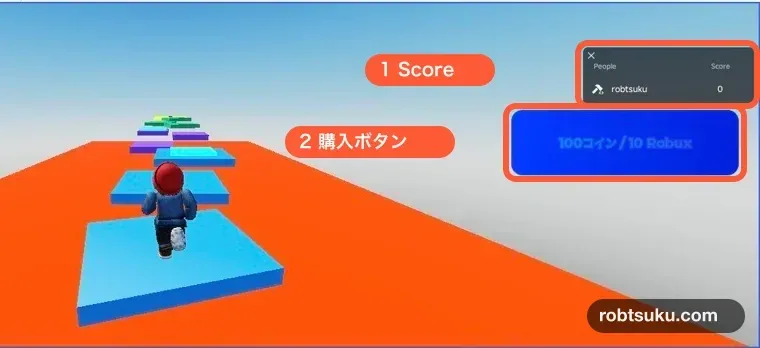
LocalScriptの役割は、現在価格を表示して購入画面を開くところまでだ。価格通信に失敗した場合は価格を再読み込みを押せる。購入画面を開けなかった場合もボタンが戻る。
PromptProductPurchaseFinishedの3つ目の値は購入操作の結果だが、付与の証明には使わない。この合図では連打防止を解除するだけにし、ScoreはserverのProcessReceiptだけで変更する。
5. Studioで2回と重複receiptを確かめる
Playを押し、Scoreが読み込まれたら開始値をメモして購入ボタンを押そう。最初は購入を完了せず画面を閉じ、Scoreが開始値のまま変わらないことを確認する。
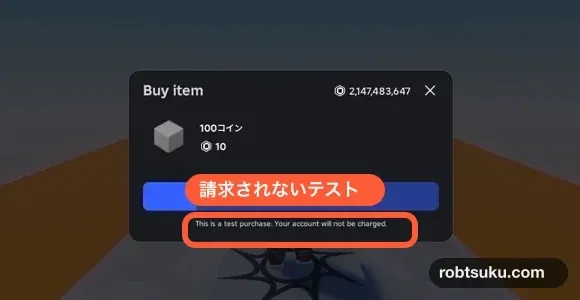
もう一度購入ボタンを押す。購入画面にStudioのテスト購入であることと、Robuxを消費しないことが両方明記された場合だけ、完了操作を1回進めよう。Scoreが100増え、OutputにReceipt processedが出るまで待つ。その時点のScoreを、次のreceipt Aを試すための新しい開始値としてメモする。少し待っても両方を確認できない場合は完了操作を繰り返さず、StopしてPlayし直し、Scoreが読み込まれた後の値を新しい開始値にする。
どちらかの表示がない場合は購入せず、画面を閉じる。この場合はScoreが変わっていない値を新しい開始値にする。以降のStudio限定テストだけで、2つの購入処理と重複防止を確認できる。
Creator Dashboardにある外部購入のTest modeは使わない。公式説明では外部購入のTest modeにも実Robuxが必要だ。この記事の完成確認は、Studio内の安全なmockまたは次のStudio限定テストだけで行う。
Server Command Barで同じreceipt処理を呼ぶ
Studioの購入画面でno-chargeを確認できない場合も、RunService:IsStudio()の中で作ったStudioReceiptTestを使える。前の記事のServer Command Bar手順と同じように、Play中にWindow > Script > Command Barを開き、緑色のServer表示へ切り替えよう。
最初のreceipt Aを実行する。
local test = game.ServerStorage.StudioReceiptTest
print(test:Invoke("A"))Scoreが100増え、OutputにPurchaseGrantedが出る。次に別のreceipt Bを実行しよう。
local test = game.ServerStorage.StudioReceiptTest
print(test:Invoke("B"))
もう100増えたら、最後にreceipt Aを再送する。
local test = game.ServerStorage.StudioReceiptTest
print(test:Invoke("A"))
確認する差は、receipt Aの直前にメモした新しい開始値を基準にしよう。開始値が3なら、receipt Aで103、receipt Bで203、receipt Aの再送後も203なら成功だ。安全なmockで先に100増えていた場合も、その増加後の値から同じように比べる。
最後にStopし、もう一度Playする。何も触れる前から最終Scoreが戻れば、購入処理で増えたコイン数をData Storeへ保存できている。
増えない、または200より多く増えるとき
Unknown Developer Product: 2本のコードに同じProduct IDを入れたか確認する- ボタンが
現在は購入できない: 商品が販売中か、Enum.InfoType.Productになっているか確認する - 購入画面を閉じても増えない: 閉じた合図だけでは正常だ。
ProcessReceiptまたはStudio限定テストの結果を見る - 同じreceiptで増える:
processedReceipts[purchaseId]の確認が加算より前にあるか確認する Receipt save failed: Data Storeへ保存できていないためNotProcessedYetになる。API設定とOutputを直し、同じreceiptを再処理する- Stop後にScoreが戻らない:
SaveScoreが2本残っていないか、PlayerScore_v1の大文字小文字が一致しているか確認する - LocalScriptからScoreを増やしている: その処理を削除する。購入特典はserverの
ProcessReceiptだけで付与する
完成
これで、同じDeveloper Productを何度でも処理しながら、各receiptにつき100コインだけを保存できた。同じreceiptが再送されても二重には増えず、保存失敗時はRobloxへ完了を返さない。
次は、コインで買うアイテムの元になる、手に持てるToolを作る。