Sell Coins with a Roblox Developer Product
Create a repeatable 100-coin product, grant and save it through ProcessReceipt, and prevent one PurchaseId from awarding coins twice.
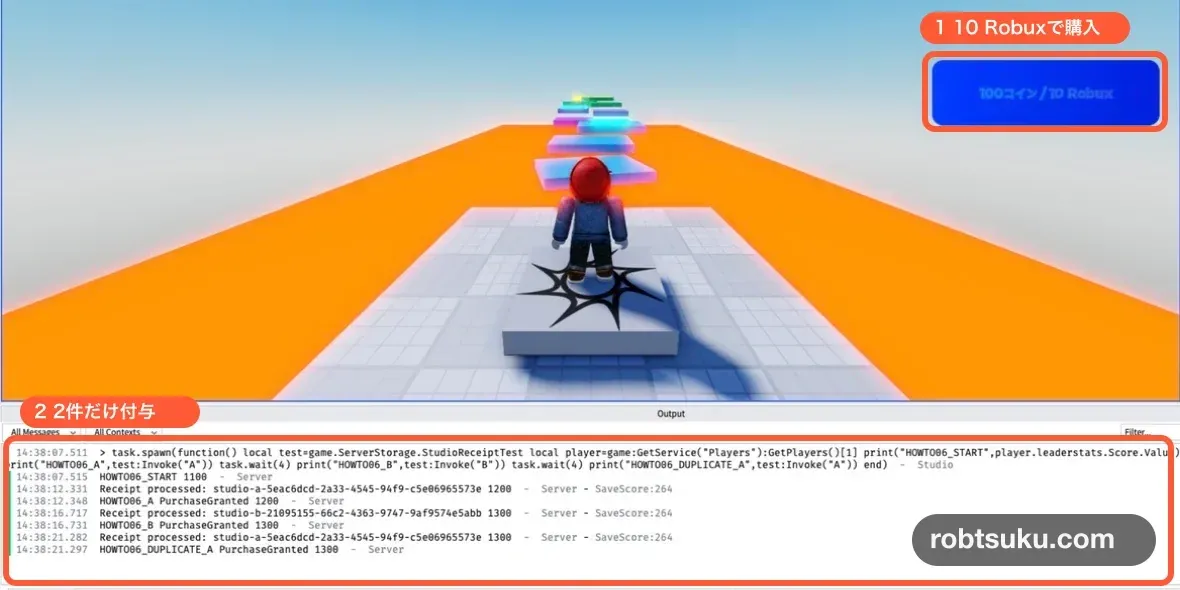
Process the same Developer Product twice and Score should increase by 100 each time. Process the first PurchaseId again and the value should stay unchanged. The finished test grants exactly 200 for two unique receipts and saves that result.
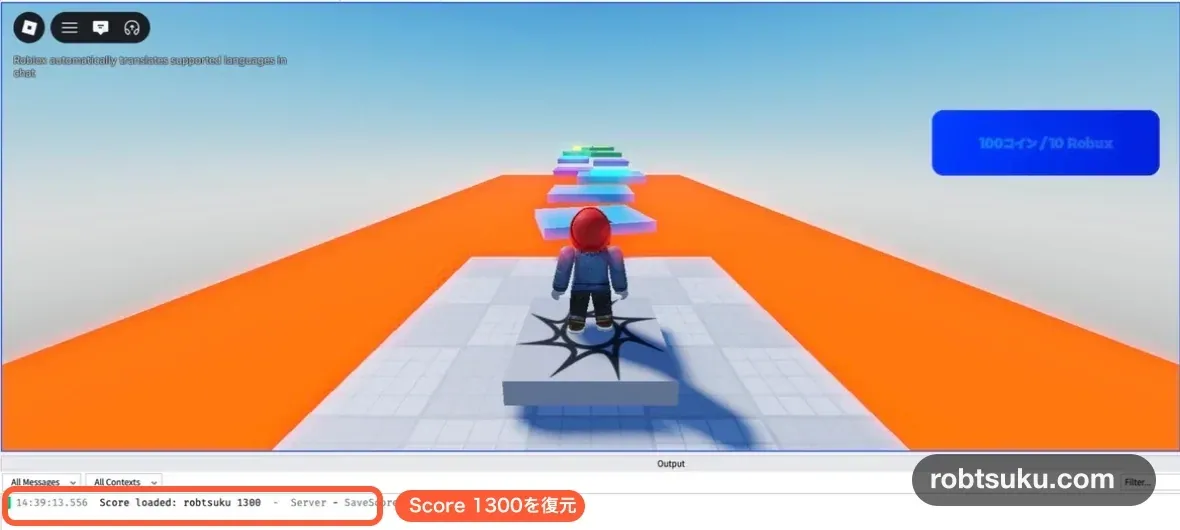
Figure guide: The top orange marker identifies the 10-Robux product button. The lower marker identifies the two successful grants in Output; the duplicate receipt is processed without a third increase.
Start after completing Save Player Coins with Data Stores. Your published test experience should contain ServerScriptService > SaveScore and restore Score after a player leaves and rejoins.
This guide uses Studio test paths for its completion checks, so you will not spend Robux. A live player would pay the Robux amount shown in the production purchase prompt. This lesson does not create a real purchase, sale, transaction history entry, or persistent mock entitlement.
Tip — A Developer Product can be purchased repeatedly
A Developer Product suits repeatable items such as 100 coins or a health refill. Use a Pass for a one-time privilege such as VIP access. This lesson proves that two separate purchases of the same 100-coin product can both be granted.
Tip — A receipt identifies one purchase attempt
Roblox supplies a
PurchaseIdwith a purchase receipt. The server must grant 100 only once for a given PurchaseId. A different PurchaseId can grant another 100, while a repeated ID must not grant twice.
1. Create the 100 Coins product
Open the experience in Creator Dashboard and go to Monetization > Developer Products. Select Create a Developer Product and enter:
| Field | Value |
|---|---|
| Name | 100 Coins |
| Description | Adds 100 coins to the in-game Score |
| Item for Sale | on |
| Price | 10 |
| Managed Pricing | off |
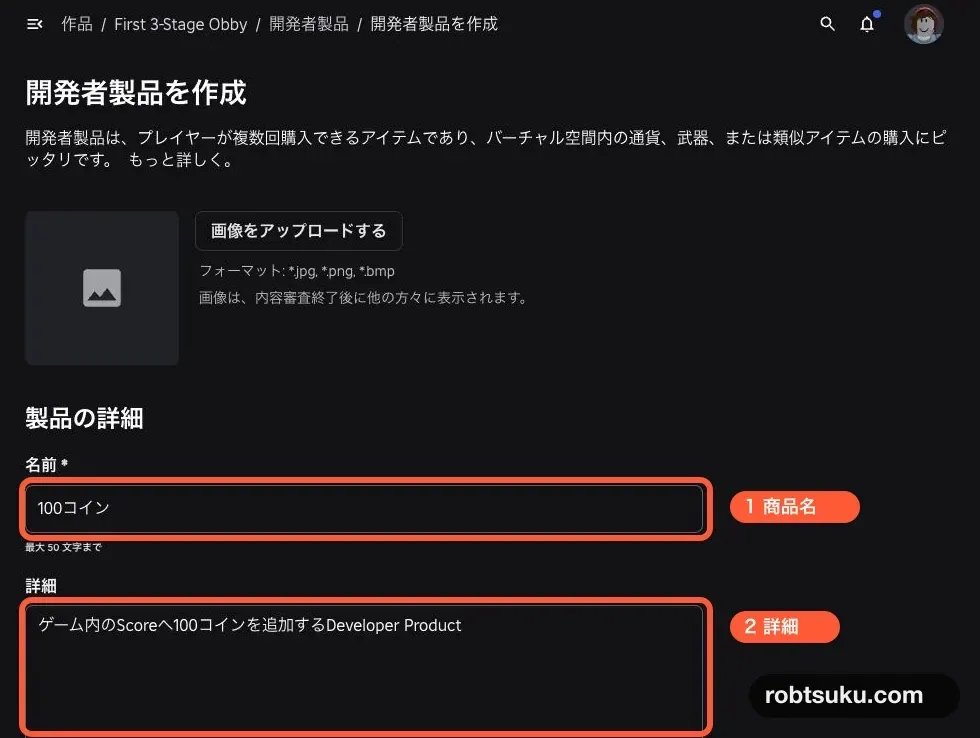
Figure guide: In this Japanese Dashboard capture, marker 1 surrounds Name and marker 2 surrounds Description. Enter the English values from the table in those two fields.
Managed Pricing is off here so the captured base price remains easy to compare. A production experience may enable it and show different prices to different players. In either case, do not hard-code 10 into the game UI; section 4 loads the current price through the API.
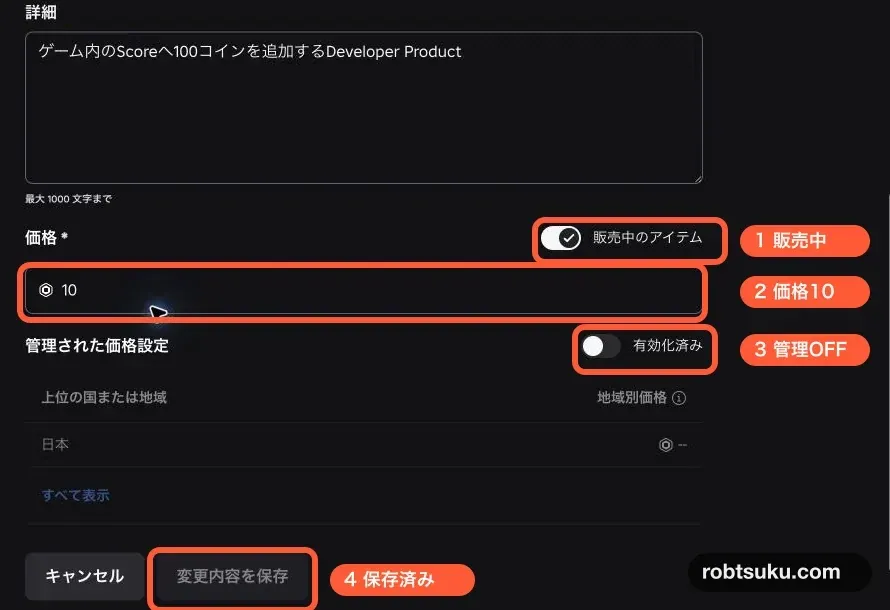
Figure guide: The numbered markers identify Item for Sale (1), the base price of 10 (2), Managed Pricing turned off (3), and the saved state (4).
Select Save Changes, then copy the number in the product list’s Product ID column. If an options menu offers Copy Asset ID, that number is also the Product ID.
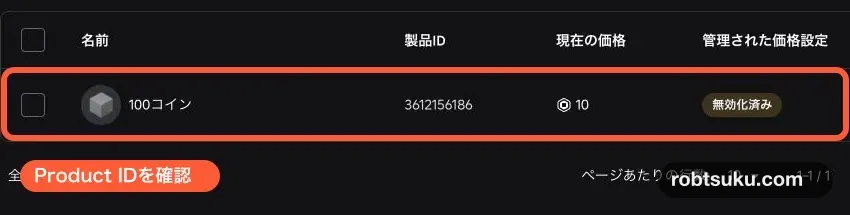
Figure guide: The orange outlined row contains the product name, Product ID, current price, and Managed Pricing status. Copy the long number in the Product ID column.
The Product ID identifies the product in code. Replace only the 0 in each PRODUCT_ID = 0 line with your copied number.
2. Replace SaveScore with receipt-aware saving
The server grants Developer Products through MarketplaceService.ProcessReceipt. It validates the Product ID, Player ID, and PurchaseId, then reports completion only after both Score and the processed PurchaseId have been saved.
Open ServerScriptService > SaveScore, delete its current contents, and paste the following code. Replace both later PRODUCT_ID placeholders with the same copied number.
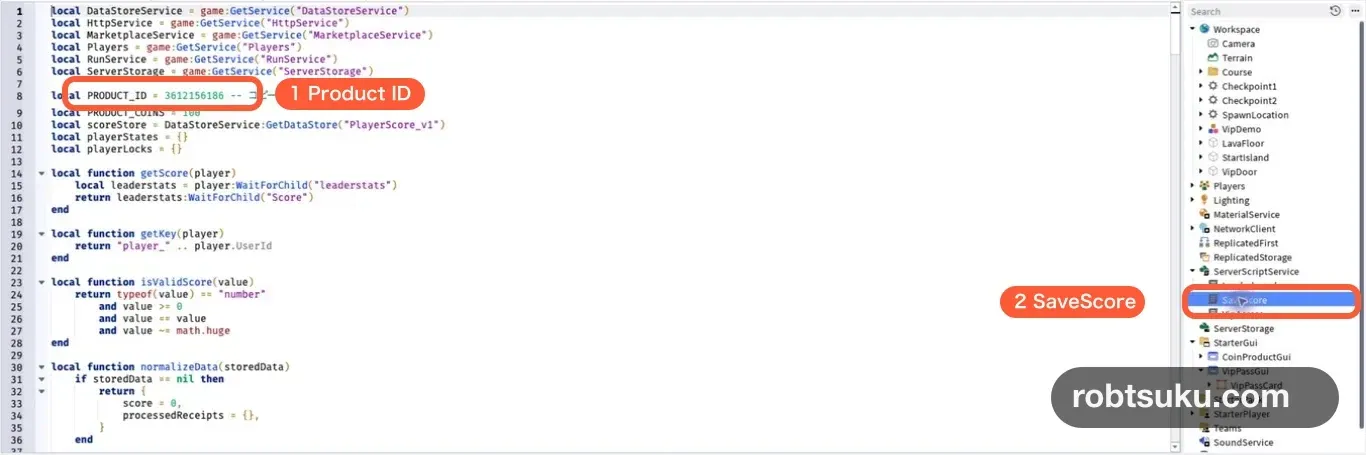
local DataStoreService = game:GetService("DataStoreService")
local HttpService = game:GetService("HttpService")
local MarketplaceService = game:GetService("MarketplaceService")
local Players = game:GetService("Players")
local RunService = game:GetService("RunService")
local ServerStorage = game:GetService("ServerStorage")

local PRODUCT_ID = 0 -- Replace 0 with the copied Product ID
local PRODUCT_COINS = 100
local scoreStore = DataStoreService:GetDataStore("PlayerScore_v1")
local playerStates = {}
local playerLocks = {}

local function getScore(player)
	local leaderstats = player:WaitForChild("leaderstats")
	return leaderstats:WaitForChild("Score")
end

local function getKey(player)
	return "player_" .. player.UserId
end

local function isValidScore(value)
	return typeof(value) == "number"
		and value >= 0
		and value == value
		and value ~= math.huge
end

local function normalizeData(storedData)
	if storedData == nil then
		return {
			score = 0,
			processedReceipts = {},
		}
	end

	if isValidScore(storedData) then
		return {
			score = storedData,
			processedReceipts = {},
		}
	end

	if typeof(storedData) ~= "table" then
		return nil
	end

	if not isValidScore(storedData.score) then
		return nil
	end

	local storedReceipts = storedData.processedReceipts
	if storedReceipts ~= nil and typeof(storedReceipts) ~= "table" then
		return nil
	end

	for purchaseId, productId in pairs(storedReceipts or {}) do
		if typeof(purchaseId) ~= "string"
			or purchaseId == ""
			or (
				typeof(productId) ~= "number"
				and productId ~= true
			)
		then
			return nil
		end
	end

	local data = table.clone(storedData)
	data.score = storedData.score
	data.processedReceipts =
		storedReceipts and table.clone(storedReceipts) or {}
	return data
end

local function withPlayerLock(player, callback)
	while playerLocks[player] do
		task.wait()
	end

	playerLocks[player] = true
	local results = table.pack(pcall(callback))
	playerLocks[player] = nil
	return table.unpack(results, 1, results.n)
end

local function loadScore(player)
	local state = {
		status = "loading",
		persistedScore = 0,
		finalSaveStarted = false,
	}
	playerStates[player] = state

	local success, errorMessage = withPlayerLock(player, function()
		local score = getScore(player)
		local storedData = scoreStore:GetAsync(getKey(player))
		local data = normalizeData(storedData)
		if not data then
			error("Stored score data has an unexpected format")
		end

		score.Value += data.score
		state.persistedScore = data.score
		state.status = "ready"
		print("Score loaded:", player.Name, score.Value)
	end)

	if not success then
		state.status = "failed"
		warn("Score load failed:", errorMessage)
	end

	player:SetAttribute("ScoreDataReady", state.status == "ready")
end

local function waitForReadyState(player)
	while player.Parent == Players and not playerStates[player] do
		task.wait()
	end

	local state = playerStates[player]
	if not state then
		return nil
	end

	while state.status == "loading" and player.Parent == Players do
		task.wait()
	end

	if player.Parent ~= Players or state.status ~= "ready" then
		return nil
	end

	return state
end

local function saveScore(player)
	local state = playerStates[player]
	if not state then
		return
	end

	local success, errorMessage = withPlayerLock(player, function()
		if state.finalSaveStarted then
			return
		end
		state.finalSaveStarted = true

		if state.status ~= "ready" then
			return
		end

		local score = getScore(player)
		local scoreAtStart = score.Value
		local scoreDelta = scoreAtStart - state.persistedScore
		local updatedData = scoreStore:UpdateAsync(
			getKey(player),
			function(storedData)
				local data = normalizeData(storedData)
				if not data then
					return nil
				end

				data.score = math.max(0, data.score + scoreDelta)
				return data
			end
		)

		if updatedData == nil then
			error("Player data update was cancelled")
		end
		updatedData = normalizeData(updatedData)
		if not updatedData then
			error("Stored score data has an unexpected format")
		end

		local changesDuringSave = score.Value - scoreAtStart
		local reconciledScore = math.max(
			0,
			updatedData.score + changesDuringSave
		)
		score.Value = reconciledScore
		state.persistedScore = updatedData.score
		print("Score saved:", player.Name, updatedData.score)
	end)

	if not success then
		warn("Score save failed:", errorMessage)
	end
end

local function processReceipt(receiptInfo)
	if typeof(receiptInfo) ~= "table" then
		return Enum.ProductPurchaseDecision.NotProcessedYet
	end

	if receiptInfo.ProductId ~= PRODUCT_ID then
		warn("Unknown Developer Product:", receiptInfo.ProductId)
		return Enum.ProductPurchaseDecision.NotProcessedYet
	end

	if typeof(receiptInfo.PlayerId) ~= "number"
		or typeof(receiptInfo.PurchaseId) ~= "string"
		or receiptInfo.PurchaseId == ""
	then
		return Enum.ProductPurchaseDecision.NotProcessedYet
	end

	local player = Players:GetPlayerByUserId(receiptInfo.PlayerId)
	if not player then
		return Enum.ProductPurchaseDecision.NotProcessedYet
	end

	local state = waitForReadyState(player)
	if not state then
		return Enum.ProductPurchaseDecision.NotProcessedYet
	end

	local success, decisionOrError = withPlayerLock(player, function()
		if state.status ~= "ready" then
			return Enum.ProductPurchaseDecision.NotProcessedYet
		end

		local score = getScore(player)
		local durableScoreBefore = state.persistedScore
		local purchaseId = receiptInfo.PurchaseId
		local updatedData = scoreStore:UpdateAsync(
			getKey(player),
			function(storedData)
				local data = normalizeData(storedData)
				if not data then
					return nil
				end

				if data.processedReceipts[purchaseId] ~= nil then
					return data
				end

				data.score += PRODUCT_COINS
				data.processedReceipts[purchaseId] =
					receiptInfo.ProductId
				return data
			end
		)

		if updatedData == nil then
			error("Player data update was cancelled")
		end
		updatedData = normalizeData(updatedData)
		if not updatedData then
			error("Stored score data has an unexpected format")
		end

		local unsavedLocalChange =
			score.Value - durableScoreBefore
		local reconciledScore = math.max(
			0,
			updatedData.score + unsavedLocalChange
		)
		score.Value = reconciledScore
		state.persistedScore = updatedData.score
		print("Receipt processed:", purchaseId, score.Value)

		return Enum.ProductPurchaseDecision.PurchaseGranted
	end)

	if not success then
		warn("Receipt save failed:", decisionOrError)
		return Enum.ProductPurchaseDecision.NotProcessedYet
	end

	return decisionOrError
end

Players.PlayerAdded:Connect(loadScore)
Players.PlayerRemoving:Connect(function(player)
	saveScore(player)
	playerStates[player] = nil
	playerLocks[player] = nil
end)

game:BindToClose(function()
	for _, player in Players:GetPlayers() do
		saveScore(player)
	end
end)

MarketplaceService.ProcessReceipt = processReceipt

if RunService:IsStudio() then
	local receiptIds = {
		A = "studio-a-" .. HttpService:GenerateGUID(false),
		B = "studio-b-" .. HttpService:GenerateGUID(false),
	}
	local studioReceiptTest = Instance.new("BindableFunction")
	studioReceiptTest.Name = "StudioReceiptTest"
	studioReceiptTest.Parent = ServerStorage

	studioReceiptTest.OnInvoke = function(label)
		if not receiptIds[label] then
			return "Use A or B"
		end

		local players = Players:GetPlayers()
		if #players ~= 1 then
			return "Run this in a one-player Play test"
		end

		local player = players[1]
		local decision = processReceipt({
			PlayerId = player.UserId,
			ProductId = PRODUCT_ID,
			PurchaseId = receiptIds[label],
		})
		return decision.Name, getScore(player).Value
	end
end
Press Play after pasting. Wait for the saved Score to appear and for Output to show Score loaded. If Output shows a red error, stop and check that only one SaveScore Script exists, the store remains PlayerScore_v1, and the code has no red underline.
The previous guide stored a number by itself. normalizeData() converts that number into a table containing score and an empty processedReceipts map, preserving the existing balance. Unexpected data fails closed instead of being overwritten with zero.
withPlayerLock() serializes loading, leaving, and receipt processing for one player. Concurrent work for a different player continues independently.
3. Grant and save only through ProcessReceipt
The pasted code assigns the one Developer Product handler to MarketplaceService.ProcessReceipt. Roblox also directs developers to grant through ProcessReceipt rather than the prompt-close event.
For a new PurchaseId, one UpdateAsync() writes both the new Score and the receipt ID. A successful write returns PurchaseGranted; a failed or unverifiable write returns NotProcessedYet.
Roblox’s player purchasing implementation follows the same order: check for a processed PurchaseId, apply the grant, record the ID, save, and then acknowledge the receipt.
Do not grant coins from PromptProductPurchaseFinished. That event only reports that the prompt flow ended; it is not proof that a receipt was processed. Never trust a client-supplied price, balance, or “purchase succeeded” flag.
Important — Assign ProcessReceipt in one place
MarketplaceService.ProcessReceiptholds one callback. When you add more products, route additional Product IDs inside this handler instead of overwriting it from another Script.
Tip — Larger games need a scalable receipt ledger
This one-product lesson keeps processed PurchaseIds in each player’s Data Store record. A game with many products or purchases should plan a receipt ledger around Data Store size and players moving between servers.
4. Build a button that displays the current price
Following the card structure from the Pass purchase button guide, add a ScreenGui named CoinProductGui to StarterGui. Add a TextButton named Buy100Coins, then add a LocalScript named ProductButton inside it.
CoinProductGui
└─ Buy100Coins (TextButton)
   └─ ProductButton (LocalScript)
Tip — A LocalScript controls only the player’s screen
This LocalScript loads the displayed price and opens the prompt for the local player. It never adds coins. The server’s
ProcessReceipthandler owns the grant.
Replace ProductButton with this code and use the same Product ID:
local MarketplaceService = game:GetService("MarketplaceService")
local Players = game:GetService("Players")

local PRODUCT_ID = 0 -- Replace 0 with the copied Product ID
local player = Players.LocalPlayer
local button = script.Parent
local productReady = false
local canRetry = false
local loading = false
local promptOpen = false

local function updateButton()
	button.Active =
		(productReady or canRetry)
		and not loading
		and not promptOpen
	button.AutoButtonColor = button.Active
end

local function loadProduct()
	loading = true
	productReady = false
	canRetry = false
	button.Text = "Loading price..."
	updateButton()

	local success, productInfo = pcall(function()
		return MarketplaceService:GetProductInfoAsync(
			PRODUCT_ID,
			Enum.InfoType.Product
		)
	end)

	if not success then
		warn("Product info failed:", productInfo)
		button.Text = "Reload price"
		canRetry = true
	elseif not productInfo.IsForSale
		or typeof(productInfo.PriceInRobux) ~= "number"
	then
		button.Text = "Currently unavailable"
	else
		button.Text =
			productInfo.Name
			.. " / "
			.. productInfo.PriceInRobux
			.. " Robux"
		productReady = true
	end

	loading = false
	updateButton()
end

button.Activated:Connect(function()
	if canRetry then
		loadProduct()
		return
	end

	if not productReady or promptOpen then
		return
	end

	promptOpen = true
	updateButton()
	local success, errorMessage = pcall(function()
		MarketplaceService:PromptProductPurchase(player, PRODUCT_ID)
	end)
	if not success then
		warn("Product prompt failed:", errorMessage)
		promptOpen = false
		updateButton()
	end
end)

MarketplaceService.PromptProductPurchaseFinished:Connect(
	function(userId, productId, _isPurchased)
		if userId == player.UserId and productId == PRODUCT_ID then
			promptOpen = false
			updateButton()
		end
	end
)

loadProduct()
The regional pricing guidance uses GetProductInfoAsync() from a LocalScript to display the current PriceInRobux. If loading fails, the button offers a retry. If opening the prompt fails, the button becomes active again.
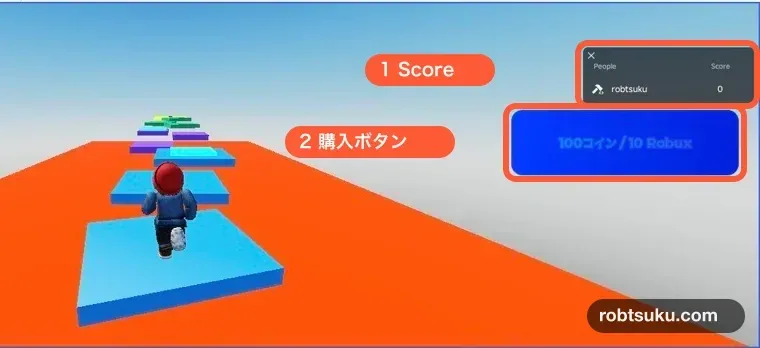
Figure guide: Marker 1 surrounds the server-owned
Scoredisplay. Marker 2 surrounds the button that shows the product name and current API price.
The _isPurchased result in PromptProductPurchaseFinished is deliberately unused for the grant. It only releases the prompt-open guard.
5. Test two unique receipts and one duplicate
Press Play, wait for Score to load, record its starting value, and select the purchase button. Close the first prompt without completing it. Score must remain unchanged.
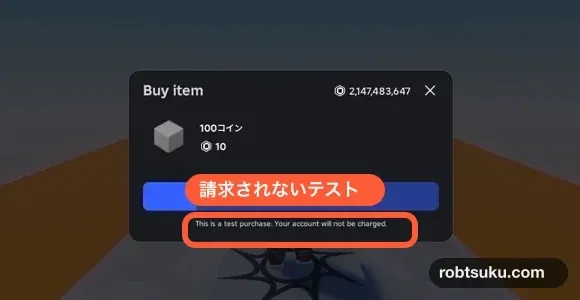
Open the prompt again. Continue once only if it explicitly identifies a Studio test or mock purchase and says your account will not be charged. Wait until Score rises by 100 and Output shows Receipt processed. If either result is missing, do not repeat the completion action; stop and start a fresh Play session.
If the prompt lacks either safety statement, close it without purchasing. The Studio-only server test below can verify the same receipt handler without a checkout.
Do not use Creator Dashboard’s external purchase Test mode. Roblox’s Developer Product Test mode documentation states that this separate flow uses real Robux. This guide uses only Studio’s no-charge mock path or the server-owned Studio harness.
Run the same handler from the Server Command Bar
During Play, open Window > Script > Command Bar and switch it to the green Server context, following the Server Command Bar prerequisite.
Invoke receipt A:
local test = game.ServerStorage.StudioReceiptTest
print(test:Invoke("A"))
Score should rise by 100 and Output should include PurchaseGranted. Invoke receipt B:
local test = game.ServerStorage.StudioReceiptTest
print(test:Invoke("B"))
After another 100, invoke receipt A again:
local test = game.ServerStorage.StudioReceiptTest
print(test:Invoke("A"))
Compare differences rather than fixed totals. If the starting value before A is 3, the three checks should show 103, 203, and 203. A previous safe mock grant may change the baseline, but not this pattern.
Press Stop, then begin a fresh Play session. The final Score should load before you touch anything, proving that the granted coins and receipt IDs were persisted together.
Troubleshooting
Unknown Developer Product: Put the same Product ID in both Scripts.- The button says
Currently unavailable: Confirm that the product is for sale and the query usesEnum.InfoType.Product. - Closing the prompt does not add coins: That is correct. Only
ProcessReceiptor the Studio server harness grants. - A duplicate receipt adds coins: Keep the
processedReceipts[purchaseId]check beforedata.score += PRODUCT_COINS. - Output says
Receipt save failed: The handler returnsNotProcessedYet. Fix API access or the reported error, then allow Roblox to retry the same receipt. - The Score disappears after restarting Play: Remove duplicate
SaveScoreScripts and match the exact store namePlayerScore_v1. - A LocalScript changes Score: Remove that grant. Only the server’s receipt handler may add purchased coins.
Completion check
- Closing or cancelling the prompt leaves Score unchanged.
- One unique receipt adds and saves exactly 100.
- A second unique receipt adds and saves another 100.
- Repeating the first PurchaseId adds zero.
- A save failure returns
NotProcessedYet. - A fresh Play session restores the final Score.
- No real Robux was spent or requested.
The repeatable Developer Product now grants once per receipt and keeps the balance durable. Next, create a Tool that a player can hold.
Official sources
Add a Game Pass Purchase Button in Roblox
Show a Pass name and current price in an in-game card, open Roblox’s purchase prompt, and apply owned UI through a server test.
Build this feature
Create a Roblox VIP Door with a Game Pass
Check Game Pass ownership on the server and use collision groups so guests stop at a VIP door while members can walk through.
Build this feature